During interviews, we often hear — or say ourselves — that searching in an array is slower than in a hashtable. Some might even recall that array search has linear complexity, or O(n), while a hash table has constant complexity, O(1). But does this hold true in practice? What if there are situations where searching in an array turns out to be faster? Let's not rush to conclusions.
So, let's compare searching in an array and a HashSet on small collections, using different types: a primitive int and a reference type string.
Full benchmark code. Click to expand.
using System.Collections.Generic;
using System.Linq;
using BenchmarkDotNet.Attributes;
using BenchmarkDotNet.Jobs;

namespace Benchmarks
{
[ShortRunJob(RuntimeMoniker.Net60)]
[ShortRunJob(RuntimeMoniker.Net80)]
[ShortRunJob(RuntimeMoniker.Net10_0)]
[HideColumns("Job", "Error", "StdDev", "Gen0", "Median")]
[DisassemblyDiagnoser(printSource: true, maxDepth: 2)]
public class HashSetContainsBenchmark
{
[Params(1, 10, 100, 1000)]
public int Size { get; set; }

        private int[] _arrayInt;
        private HashSet<int> _hashSetInt;
        private int _missingInt;

        private string[] _arrayString;
        private HashSet<string> _hashSetString;
        private string _missingString;

        [GlobalSetup]
        public void Setup()
        {
            // --- Int Setup ---
            var intData = Enumerable.Range(0, Size).ToArray();
            _arrayInt = intData;
            _hashSetInt = new HashSet<int>(intData);
            _missingInt = Size + 1;

            // --- String Setup ---
            var stringData = Enumerable.Range(0, Size).Select(i => $"value-{i}").ToArray();
            _arrayString = stringData;
            _hashSetString = new HashSet<string>(stringData);
            _missingString = "value-a";
        }

        // --- Int Benchmarks ---
        [Benchmark(Description = "Array.Contains (Int)")]
        public bool Int_Array() => _arrayInt.Contains(_missingInt);

        [Benchmark(Description = "HashSet.Contains (Int)")]
        public bool Int_HashSet() => _hashSetInt.Contains(_missingInt);

        // --- String Benchmarks ---
        [Benchmark(Description = "Array.Contains (String)")]
        public bool String_Array() => _arrayString.Contains(_missingString);

        [Benchmark(Description = "HashSet.Contains (String)")]
        public bool String_HashSet() => _hashSetString.Contains(_missingString);
    }
}
| Method                      | Runtime   | Size |     Mean | Code Size |
|-----------------------------|-----------|------|---------:|----------:|
|  Array.Contains (Int)       | .NET 6.0  | 1    | 3.443 ns |      50 B |
|  HashSet.Contains (Int)     | .NET 6.0  | 1    | 2.052 ns |     447 B |
|  Array.Contains (String)    | .NET 6.0  | 1    | 8.621 ns |      57 B |
|  HashSet.Contains (String)  | .NET 6.0  | 1    | 4.741 ns |     737 B |
|  Array.Contains (Int)       | .NET 8.0  | 1    | 2.676 ns |      40 B |
|  HashSet.Contains (Int)     | .NET 8.0  | 1    | 1.954 ns |     385 B |
|  Array.Contains (String)    | .NET 8.0  | 1    | 9.639 ns |      51 B |
|  HashSet.Contains (String)  | .NET 8.0  | 1    | 4.599 ns |     351 B |
|  Array.Contains (Int)       | .NET 10.0 | 1    | 1.193 ns |     669 B |
|  HashSet.Contains (Int)     | .NET 10.0 | 1    | 1.666 ns |     377 B |
|  Array.Contains (String)    | .NET 10.0 | 1    | 2.285 ns |     548 B |
|  HashSet.Contains (String)  | .NET 10.0 | 1    | 3.698 ns |     233 B |
Intuitively, it seems that iterating over one element in an array should be faster than the more complex mechanism of hash-based searching. As we can see, even when searching in a collection of a single int, the array loses to HashSet up until .NET 10:
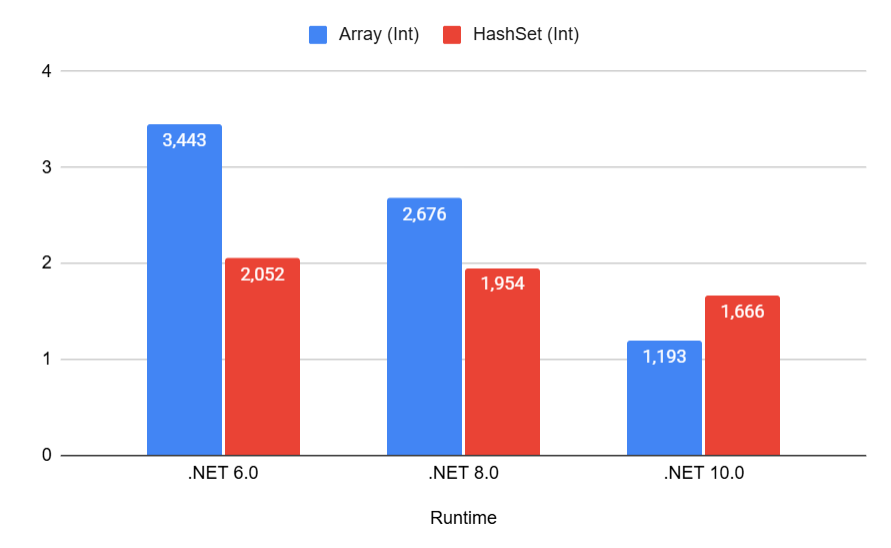
And even then, the advantage is quite small.
We observe the same picture for strings:
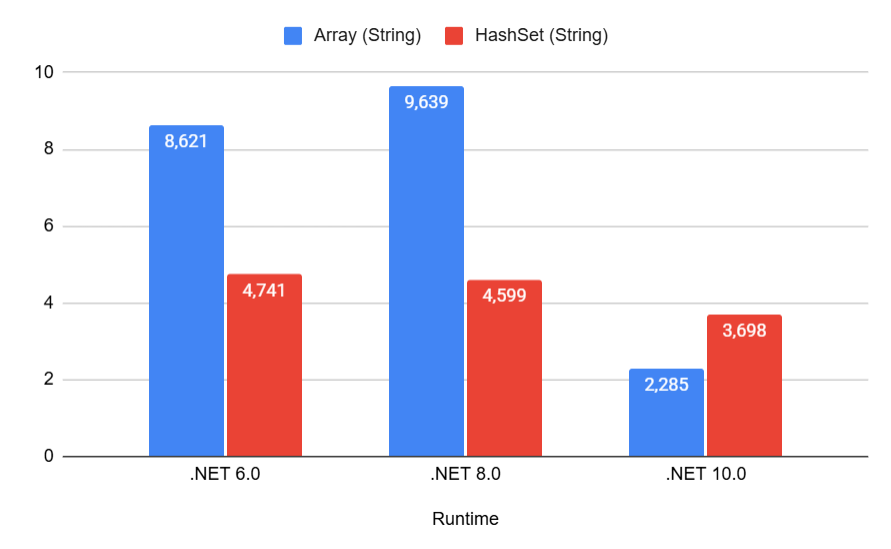
Notice how in .NET 10, array search for strings (2.285 ns) even beats HashSet (3.698 ns) — we'll explain why later.
Alright, collections of one element are weird. Let's take the larger size — 10 elements. Surely, the advantage of HashSet should become more obvious there:
| Method                      | Runtime   | Size |      Mean | Code Size |
|-----------------------------|-----------|------|----------:|----------:|
|  Array.Contains (Int)       | .NET 6.0  | 10   |  4.059 ns |      50 B |
|  HashSet.Contains (Int)     | .NET 6.0  | 10   |  2.901 ns |     447 B |
|  Array.Contains (String)    | .NET 6.0  | 10   | 33.465 ns |      57 B |
|  HashSet.Contains (String)  | .NET 6.0  | 10   |  5.807 ns |     737 B |
|  Array.Contains (Int)       | .NET 8.0  | 10   |  3.137 ns |      40 B |
|  HashSet.Contains (Int)     | .NET 8.0  | 10   |  2.497 ns |     397 B |
|  Array.Contains (String)    | .NET 8.0  | 10   | 31.164 ns |      51 B |
|  HashSet.Contains (String)  | .NET 8.0  | 10   |  5.937 ns |     377 B |
|  Array.Contains (Int)       | .NET 10.0 | 10   |  1.639 ns |     729 B |
|  HashSet.Contains (Int)     | .NET 10.0 | 10   |  2.230 ns |     377 B |
|  Array.Contains (String)    | .NET 10.0 | 10   | 18.063 ns |     548 B |
|  HashSet.Contains (String)  | .NET 10.0 | 10   |  4.583 ns |     233 B |
Do you see the oddities already? Here they are:
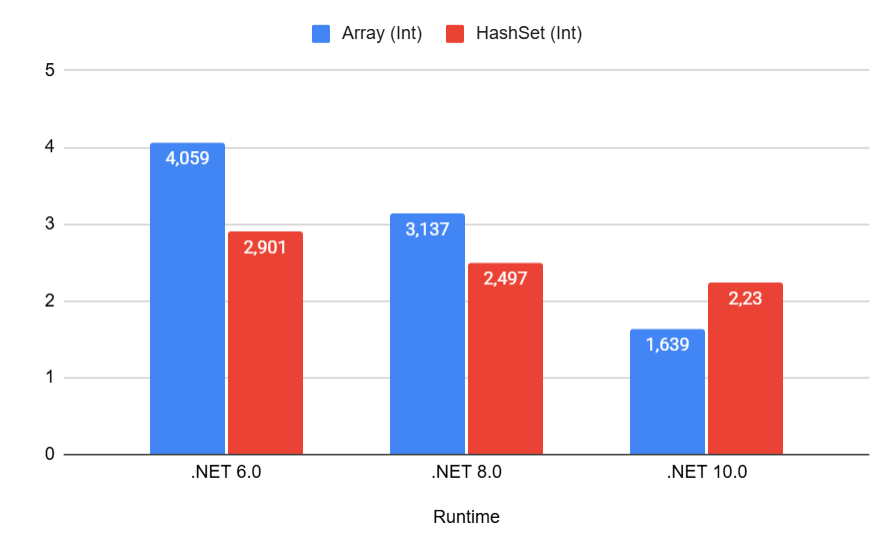
The search time in HashSet remains roughly the same regardless of the framework version, but array search keeps getting better and better.
Moreover, in .NET 10, the array overtakes HashSet! How come?
Does array search also work in constant time now?
It seems we are on the verge of a grand discovery. Let's test our hypothesis on collections of 100 elements:
| Method                      | Runtime   | Size |       Mean | Code Size |
|-----------------------------|-----------|------|-----------:|----------:|
|  Array.Contains (Int)       | .NET 6.0  | 100  |  13.073 ns |      50 B |
|  HashSet.Contains (Int)     | .NET 6.0  | 100  |   2.116 ns |     447 B |
|  Array.Contains (String)    | .NET 6.0  | 100  | 168.924 ns |      57 B |
|  HashSet.Contains (String)  | .NET 6.0  | 100  |   8.306 ns |     737 B |
|  Array.Contains (Int)       | .NET 8.0  | 100  |   4.381 ns |      40 B |
|  HashSet.Contains (Int)     | .NET 8.0  | 100  |   1.857 ns |     385 B |
|  Array.Contains (String)    | .NET 8.0  | 100  |  93.214 ns |      51 B |
|  HashSet.Contains (String)  | .NET 8.0  | 100  |   7.938 ns |     377 B |
|  Array.Contains (Int)       | .NET 10.0 | 100  |   3.401 ns |     736 B |
|  HashSet.Contains (Int)     | .NET 10.0 | 100  |   1.774 ns |     377 B |
|  Array.Contains (String)    | .NET 10.0 | 100  |  71.121 ns |     562 B |
|  HashSet.Contains (String)  | .NET 10.0 | 100  |   6.806 ns |     233 B |
Unfortunately, a miracle didn't happen. Now the array consistently loses to HashSet in searching.
But the difference for the int type is still not that significant:
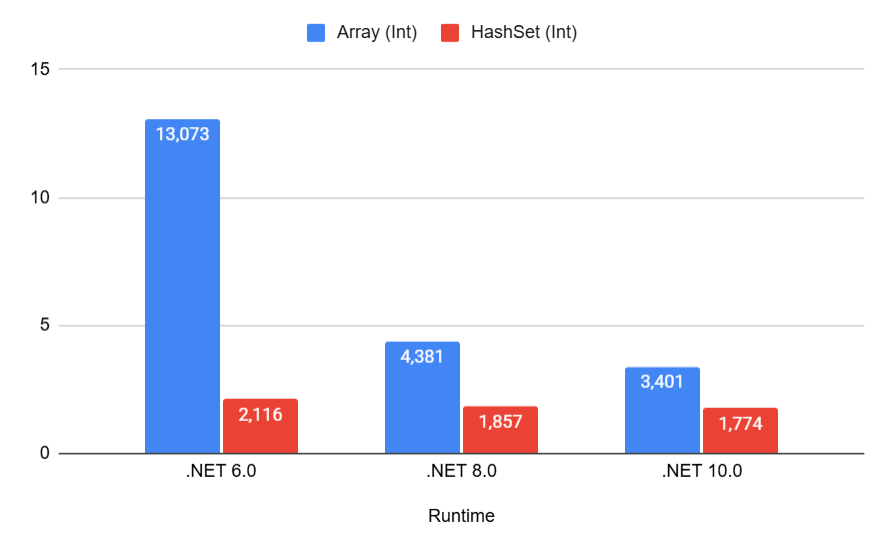
Let's look at the growth of search time in an array relative to its size. For clarity, let's add an array of 1000 elements:
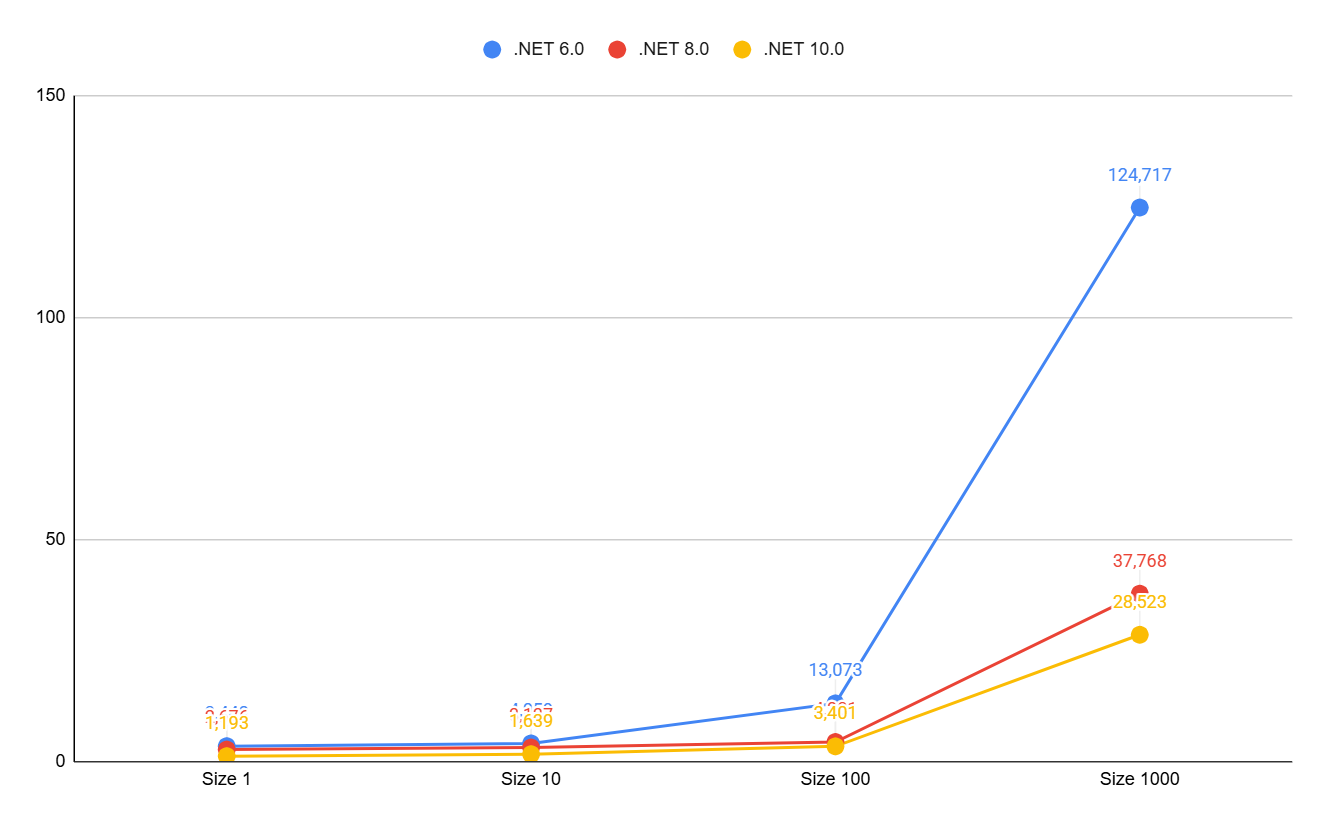
As we can see, only in .NET 6 do we begin to observe linear growth after 100 elements. And in versions 8 and 10, the growth, if not logarithmic, is heavily smoothed out.
It's time to dive deeper, specifically into exactly how array search is performed. Calling the Contains method on an array ultimately leads to calling the static Array.IndexOf method. But this is where the differences begin.
.NET 6
Using some loop-unrolling optimizations and fast access to array elements, .NET checks each element for equality:
...
while (length >= 8)
{
    length -= 8;

    if (value.Equals(Unsafe.Add(ref searchSpace, index)))
        goto Found;
    if (value.Equals(Unsafe.Add(ref searchSpace, index + 1)))
        goto Found1;
    if (value.Equals(Unsafe.Add(ref searchSpace, index + 2)))
        goto Found2;
    if (value.Equals(Unsafe.Add(ref searchSpace, index + 3)))
        goto Found3;
    if (value.Equals(Unsafe.Add(ref searchSpace, index + 4)))
        goto Found4;
    if (value.Equals(Unsafe.Add(ref searchSpace, index + 5)))
        goto Found5;
    if (value.Equals(Unsafe.Add(ref searchSpace, index + 6)))
        goto Found6;
    if (value.Equals(Unsafe.Add(ref searchSpace, index + 7)))
        goto Found7;

    index += 8;
}
// the remainder of the array (less than 8 elements) is checked next
As you can see, we sequentially check each element and get our honest O(N) complexity. Nothing unusual so far.
.NET 8
Starting with this version, the situation changes drastically.
The SpanHelpers.NonPackedIndexOfValueType method comes into play, which, in addition to loop unrolling, contains a powerful hardware optimization—vectorization:
if (Vector512.IsHardwareAccelerated && length >= Vector512<TValue>.Count)
{
    Vector512<TValue> left = Vector512.Create<TValue>(value);
    //...
}
else if (Vector256.IsHardwareAccelerated && length >= Vector256<TValue>.Count)
{
    Vector256<TValue> left = Vector256.Create<TValue>(value);
    //...
}
else
{
    Vector128<TValue> left = Vector128.Create<TValue>(value);
    //...
}
We can see the use of new types: Vector128, Vector256, Vector512 — collections for working with vector data.
And pay attention to the IsHardwareAccelerated property being checked in every condition — this is where the magic lies.
It determines whether your processor supports working with vectors of 128, 256, and 512 bits in length, respectively.
Using the Vector512 class allows operating on 16 int array elements at once.
512 bits = 64 bytes, meaning the vector holds 16 values of type int at 4 bytes each.
Unfortunately, we now have to dive into assembler to better understand how this works:
cmp r8d,4
jl near ptr M01_L03          ; If elements < 4, process one by one
cmp r8d,10h                  ; 0x10 = 16 decimal
jl near ptr M01_L18          ; If elements < 16, switch to processing using a 256-bit register (ymm)
vpbroadcastd zmm0,edx        ; Load the target value edx into the 512-bit register zmm0. Now zmm0 looks like [edx, edx, edx, ..., edx]
...
vmovups zmm1,[rcx]           ; Load the first 16 elements from memory into the 512-bit register zmm1
vpcmpeqd k1,zmm1,zmm0        ; Compare zmm1 and zmm0 for equality
kortestw k1,k1               ; Check if there is at least one match
...
vpcmpeqdis an instruction that compares two vectors element-by-element and saves the result into a special registerk1. If the fifth element matches, the fifth bit ink1will be set to 1.kortestwchecks this bitmask. If it equals 0, it means the target number is not present in the first 16 elements.
At first glance, it looks complicated, but essentially, this is a continuation of the loop unrolling concept, just at the hardware level.
And the new framework versions hide all the complexity of such optimizations from us.
Ultimately, there is no magic, and array search is still O(N). Even if it is O(N/16).
This magic only works on modern processors that support AVX-512 instructions (or AVX2 for 256-bit).
If you run this code on older hardware, .NET will gracefully fall back to Vector128 or a regular loop.
.NET 10
Let me remind you that in this version, the results for an array of length 10 got even better and even surpassed HashSet.
At the same time, the search algorithm itself hasn't changed; the code is exactly the same.
Registers larger than 512 bits haven't been invented yet. So, what's the deal? I assume that PGO (Profile-Guided Optimization) kicked in, and the compiler decided that searches will most often occur in medium-sized arrays (8–15 elements), rearranged the comparison blocks to avoid unnecessary jumps, and saved the processor a couple more clock cycles.
And remember how earlier we made a mental note of why string array search became so good in .NET 10? It's time to figure that out as well.
Let's look at the benchmark once again:
| Method                  | Runtime   | Size |     Mean | Code Size |
|-------------------------|-----------|------|---------:|----------:|
| Array.Contains (String) | .NET 8.0  | 1    | 9.639 ns |      51 B |
| Array.Contains (String) | .NET 10.0 | 1    | 2.285 ns |     548 B |
Besides the nearly fourfold difference in speed, we also see a multiple-fold difference in Code Size.
For .NET 8, the compiler didn't think twice and redirected the Contains method call to the generic Array.IndexOf method, which calls the virtual bool Equals(object obj) method for each array element.
It's reliable, but not fast.
However, in .NET 10, the compiler applied a new technique called "devirtualization" — more specifically, Guarded Devirtualization. It is understood that our collection is an array of strings and only strings. This means we can skip all those generic calls and bypass the virtual method table dispatch, and simply inline the entire string comparison loop. That is why we get 548 bytes of code versus 51. But! We get specific code for searching a string in an array, which works much faster. To see this, let's look at the assembly code again:
...
mov r8,offset MT_System.String
cmp [rcx],r8                ; Verify that we definitely have a string. Hence Guarded Devirtualization.
jne short M00_L08           ; Otherwise, compare via classic Equals
...
mov r8d,[rcx+8]             ; Read the length of the current string
cmp r8d,[rsi+8]             ; Compare it with the length of the target string
je short M00_L07            ; If lengths match - compare the strings themselves byte by byte
...
M00_L07:
lea rax,[rcx+0C]
...
lea rdx,[rsi+0C]            ; Get a pointer to the byte array where strings are stored
mov rcx,rax
call qword ptr [7FFD2A46C330] ; System.SpanHelpers.SequenceEqual - call the method that compares 2 byte arrays
...
At the same time, SequenceEqual also supports vector operations and hardware acceleration.
Wow! That's powerful! I didn't even suspect what a tremendous amount of work goes on behind a simple string search in an array.
Conclusions
Once again, the obvious conclusion suggests itself: simply updating .NET will yield a performance boost (and therefore resource savings).
Also, there is no magic; O(N) is still O(N), which is clearly noticeable at large values. However, for small values (5–10 elements), things might not be so straightforward.
But can we do better? To avoid O(N), even with hardware acceleration, but also without constantly paying the hashing overhead? We'll see...
Analyzer
I've added a rule to my analyzer that will suggest replacing an array (or list) with a HashSet if Contains is called on it.
This is useful for .NET 8 and below, and remains relevant for .NET 10 with collections larger than ~15 elements. For finer tuning, you can adjust the trigger threshold in .editorconfig — for example, only starting from five elements:
dotnet_diagnostic.CI0008.min_items_count = 5